



On this page
To repurpose a blog into a newsletter, retain the underlying evidence and give the email its own useful job. Checked November 28, 2026, our recommendation is a concise, complete email lesson or update that links to the maintained reference article. Copying a page everywhere can multiply outdated claims and work without adding value for the reader.
What do you need before you repurpose a blog into a newsletter?
You need an original article you can reuse, current sources, a permission-based mailing list and a clear email promise. Keep access to the master files and any licences for included images or quoted material.
Budget time for checking the source, adapting the structure, testing the email and reviewing the outcome. Use your existing editor and sending service for the first experiment. Automation is optional; a reliable manual checklist comes first.
This is an editorial production method, not a report of engagement gains from a campaign we ran.
Which articles are suitable to adapt?
Choose an article that solves a recurring audience problem or contains a change the subscribers need now. A strong public reference can support several distinct applications, but each email should give a clear benefit on its own.
Avoid adapting a page merely because it once received traffic. Read it again as a subscriber: what should the person understand or do after this edition? If that answer is unclear, improve the article before creating a second version.
Google’s helpful-content guidance emphasizes usefulness and trustworthy original work. It does not prescribe a magic number of channels or promise discovery from republishing.
How do you adapt the article step by step?
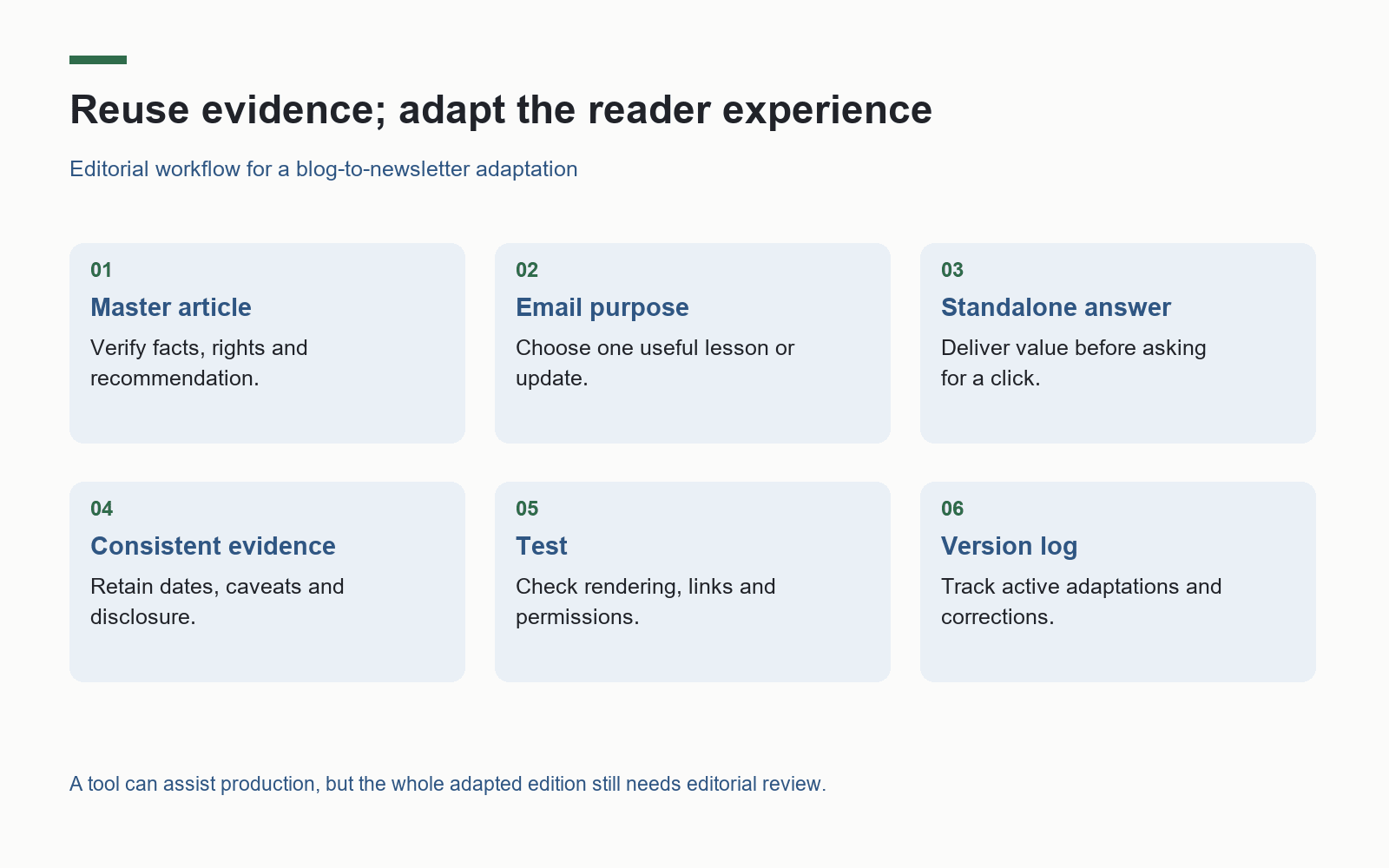
Create a controlled second expression of the idea, with one maintained factual source. Keep changes traceable so a correction reaches every active version.
- Verify the master article. Check dates, figures, product names, links and the main recommendation. Record anything that changed since the original publication.
- Choose the email’s job. Make it a practical application, a timely update or a concise decision lesson. Avoid a message that merely announces there is an article.
- Write a complete opening answer. State what the reader should know or do. Explain any important limitation before asking for a click.
- Adapt the evidence and image. Use the material necessary for this version. Keep source attribution, date and image permissions; do not crop away a condition that changes a claim.
- Choose one appropriate next action. Link to the full maintained reference where more detail helps, or to another relevant action the reader expected. Do not stack unrelated sales pitches.
- Test, publish and record the version. Check rendering, destinations, subscriber permissions and the edition date. Keep a simple log linking the email back to the source article.
Tip: Write the email’s standalone answer before its subject line. This keeps the promise aligned with what the edition actually delivers.
What does a useful adaptation look like?
A useful adaptation changes the application, not the facts. A public guide could explain how to compare paperback production specifications. An email could walk through the decision to remove an unnecessary colour section and link to the full KDP royalty method.
The email should still explain why that decision matters and what to check. Do not withhold every practical detail so the message becomes an empty teaser.
For commercial content, preserve the relevant disclosure. A relationship disclosed on the website is not automatically clear to someone reading only the email. The FTC’s endorsement guidance is one official US-facing reference; applicable rules can differ elsewhere.
How do you keep several versions accurate?
Keep one master record for the current figures and recommendation. Record which editions or posts used time-sensitive facts, and distinguish an archived historical edition from an actively promoted current guide.
When an error changes the reader’s decision, correct the maintained article and assess whether subscribers need a separate correction. Do not silently replace a public claim while continuing to promote an old email as current.
If a tool generates an adaptation, review the complete result. It can omit a condition, strengthen an uncertain statement or accidentally change a calculation. Reuse is a production shortcut, not permission to skip editorial judgment.
How do you count the time saved?
Count all shared and additional work once. The original investigation has a cost even if several channels use it, while each adaptation has its own editing, image and testing effort.
Hypothetical production comparison: assume an original article takes six hours, an email adaptation takes two hours and a later maintenance pass takes one hour. The combined process takes nine hours. Independently producing another six-hour article would take more work, but this example does not establish that the adaptation brings the same audience value or revenue.
Compare the result with its purpose: useful replies, qualified visits, retained subscribers or an appropriate commercial action. Do not optimize only for a recorded open count.
When should you keep the channels separate?
Keep them separate when the audiences or reader tasks differ substantially. A highly technical reference may need a different email explanation for beginners, or the email may serve a timely editorial need that the public guide does not cover.
Our blog versus newsletter comparison explains those roles. A distinct email promise should not be sacrificed merely to fill a calendar quickly.
Use email deliverability checks before distributing the adaptation. A useful article does not remove the need for permission, a working unsubscribe route and accurate sender identity.
Our recommendation: reuse investigation and evidence, then edit the new version for its reader. Maintain a small version log before adding automation or more channels.
Frequently asked questions
Can I paste a whole blog post into an email?
You can reuse your own permitted material, but choose the structure and length that serve the email’s promise. A distinct useful application is often clearer.
Do I need a different image for every version?
Use an image when it helps the explanation and fits the format. Keep rights, alt text and any important factual context intact.
Can AI handle the adaptation automatically?
A tool can assist, but review facts, conditions, calculations, disclosures and the complete reader experience before sending.
What happens when the original article changes?
Update the maintained source and use the version log to identify active adaptations that may need correction or clarification.
Sources
- helpful-content guidance, checked November 28, 2026.
- FTC’s endorsement guidance, checked November 28, 2026.
Information only, not financial, tax or legal advice. Fees and prices change, so check the platform before you act. Disclaimer (opens in a new tab)
Was this article helpful?



Comments